
Earnings breakdown: base pay, bonuses, and tips
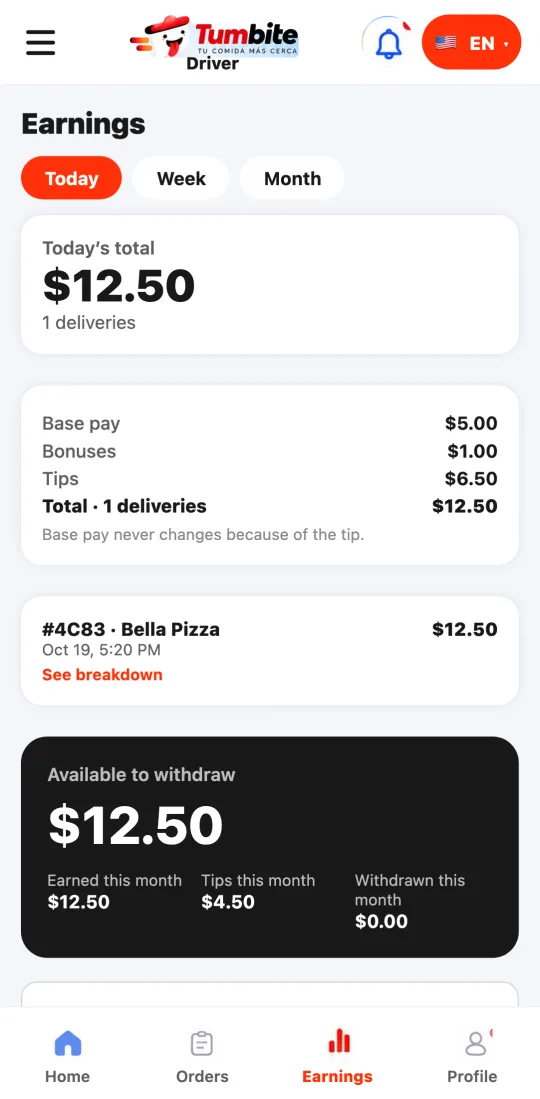
Under Earnings you see, by day, week, or month, how much was base pay, how much bonuses, and how much tips, and every order with its breakdown. A tip that arrives after delivery is added there too.
How it works
At the top, the period total split into base pay, bonuses, and tips, plus the number of deliveries. Base pay never changes because of the tip: the tip is added on top.
Below, every order with the restaurant, the time, and its total. Tap “See breakdown” for that order’s base, bonus, and tip.
If the customer tips after delivery, you get a notification and it shows as “tip after delivery” on that order and in the tips total.
Further down is your wallet: available balance, payouts, and activity.
Each order is shown in the local currency of its city, in the cities where Tumbite operates. If you deliver in cities with different currencies, you see one total per currency: they are never added together.
Steps
- Tap Earnings in the bottom bar and pick Today, Week, or Month.
- Tap an order and “See breakdown”.
- Withdraw from your wallet whenever you want.
This guide answers
- How is my pay per order calculated?
- Where do I see tips?
- What happens if the customer tips later?