
Your dashboard: how your restaurant is doing
Orders, sales, your payout, best sellers, your real kitchen time, and what customers think, at a glance.
How it works
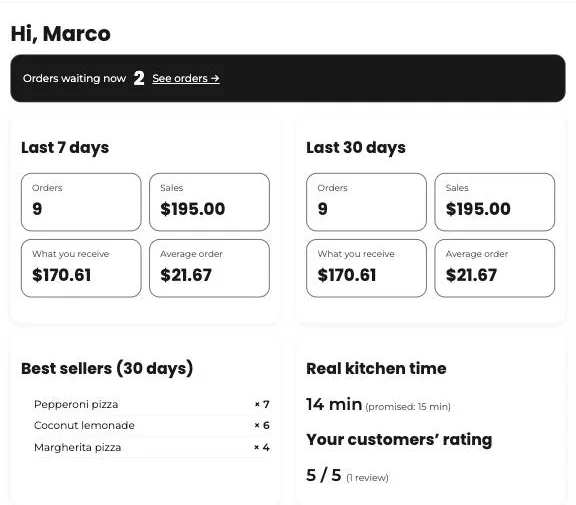
When you open your dashboard, the first thing you see is your overview. It’s designed so you know how business is going in ten seconds, without doing the math.
At the top, how many orders are waiting right now, with a direct link to them. Below, the last 7 and 30 days: orders, sales, what you receive after commission, and your average order.
Further down, your best-selling items and your real kitchen time compared with the time you promise when accepting. Cook faster than you promise and customers get their food sooner and rate you higher.
Steps
- Open your dashboard. The overview is under “Home.”
- If orders are waiting, tap “See orders” to handle them.
- Check your best sellers once a week: they’re the best guide for your promotions and gifts.
- Compare your real kitchen time with the promised time. If you’re always slower, promise a few more minutes when accepting: the traffic light and your customers will thank you.
This guide answers
- Where can I see how much I sold today?