
My ratings: what customers see about you
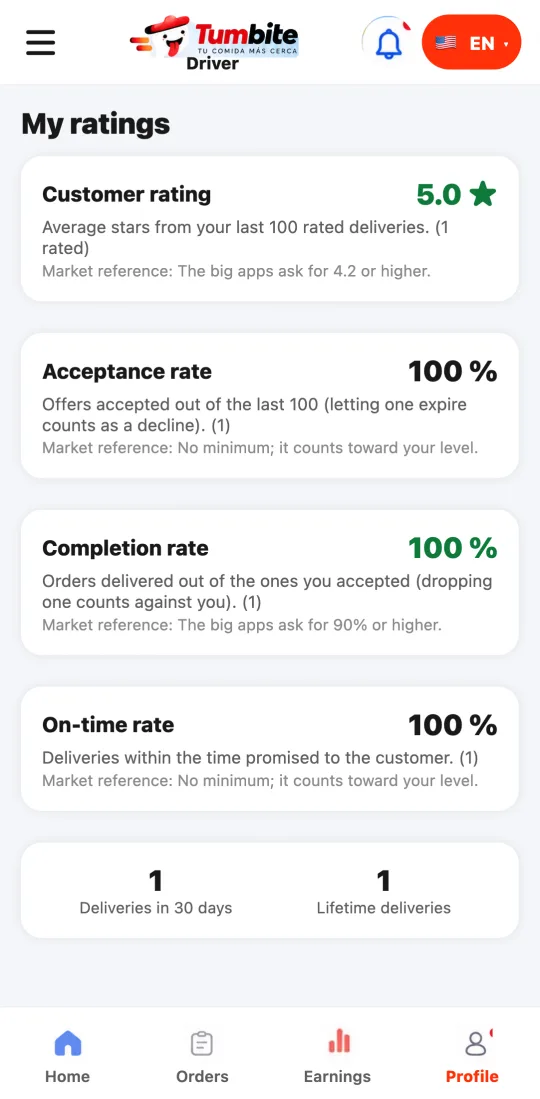
Under Profile → “My ratings” you see your customer rating, your acceptance, completion, and on-time rates, and how many deliveries you have. With the big apps’ reference next to each.
How it works
Customer rating: the average stars from your last 100 rated deliveries. If the customer doesn’t rate, it doesn’t count. The big apps ask for 4.2 or higher.
Acceptance rate: out of the last 100 offers, how many you accepted. Letting one expire counts as a decline. No minimum: it counts toward your level.
Completion rate: of the orders you accepted, how many you delivered. Dropping an order counts against you. The big apps ask for 90% or higher.
On-time rate: how many deliveries arrived within the time promised to the customer. If the restaurant runs late and you arrived on time, it’s not on you.
Deliveries in 30 days and lifetime: your history at a glance.
At Tumbite these numbers are your guide and count toward your level; nobody is deactivated because of them.
Steps
- Go to Profile and tap “My ratings”.
- Check each card: the big number is yours and the market reference is below.
- To go up: deliver what you accept, arrive on time, and take care of the delivery.
This guide answers
- Where do I see my rating as a driver?
- Does declining offers affect my rating?
- What is the completion rate?