
The bell and the coupon: your notifications and your gifts
The bell on the home screen shows what’s happening with your account right now: active orders, gifts in progress, and upcoming openings in your city. The coupon opens your gifts directly.
How it works
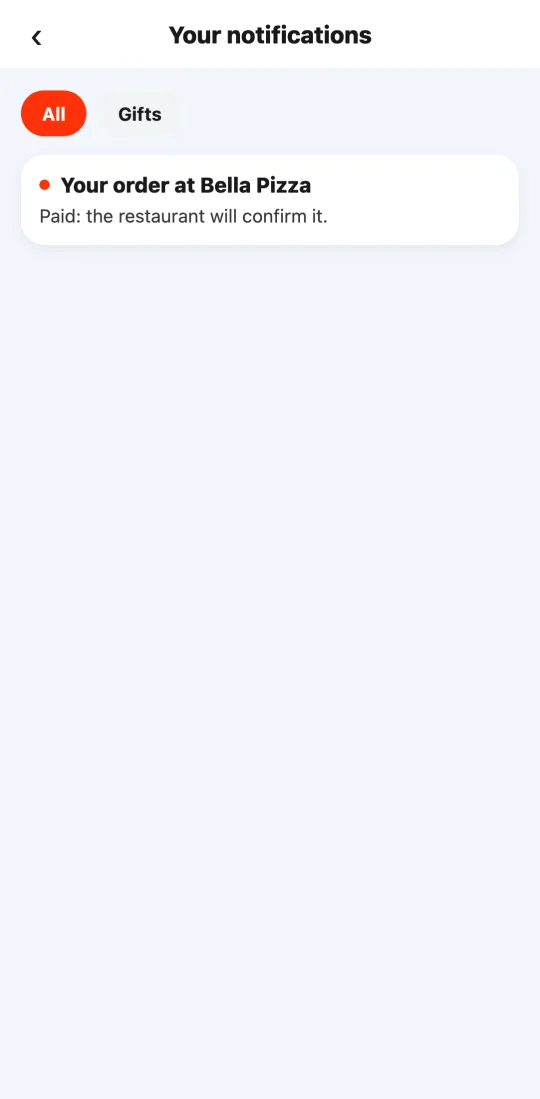
When you have an active order, the bell shows a red dot with the number of orders. Tap it to see each one with its status (“Being prepared”, “On its way to you”…) and tap an order to open tracking.
Under the “Gifts” tab (the same one the coupon opens) you see your gifts in progress: the stamp card for each restaurant you’ve ordered from, with how many orders you have and how many are left for the free dish, plus come-back discounts when they’re due. The green bar shows your progress.
We also let you know when Tumbite is about to open in a new area of your city, with the expected date when there is one.
Notifications are computed on the spot: nothing to delete or mark as read. When an order is delivered, it leaves the bell and stays under “Orders”.
If there’s nothing to report, the bell says so clearly: it never makes up notifications.
Steps
- Tap the bell at the top right of the home screen.
- Tap an order to see where it is.
- Tap “Gifts” (or the coupon on the home screen) to see your stamp cards and discounts.
This guide answers
- What is the bell in the app for?
- Where do I see my gifts and my stamp card?
- Why does the bell have a red dot?