
Pay on delivery: cash or a transfer to the driver
In cities where it’s active, you can choose to pay when your order arrives: in cash to the driver, or with a transfer to the account they have published. Your order is confirmed instantly, no card needed.
How it works
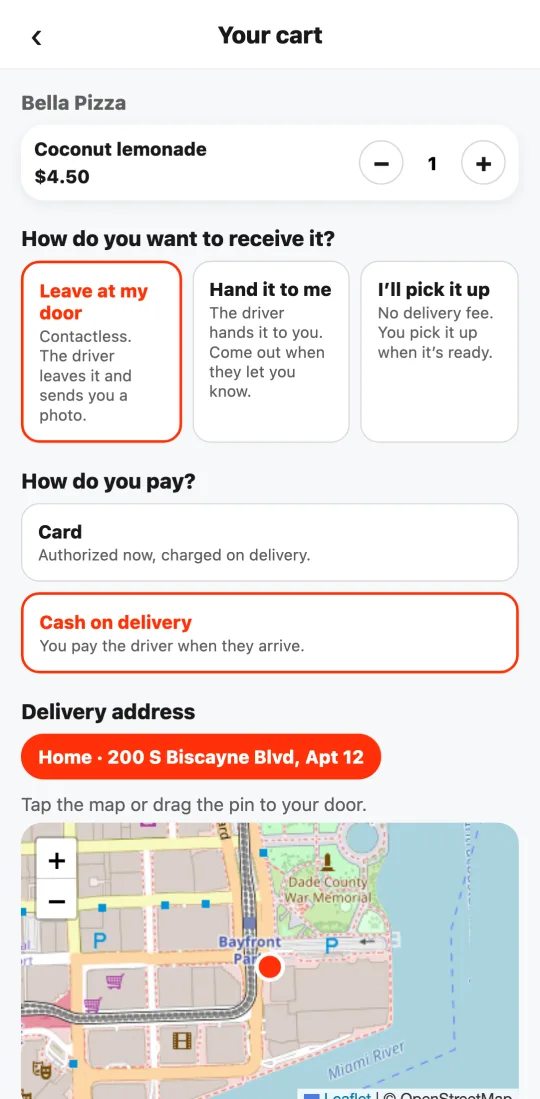
In the cart, under “How do you want to receive it?”, you’ll see “How do you pay?” with the options your city allows: card, cash on delivery, or a transfer to the driver. If your city only takes cards, that question doesn’t show.
With cash: the restaurant gets your order right away and the driver brings it. When they arrive you pay the total you see in the tracking screen (the tip you left in the app isn’t charged in cash: it’s separate and all theirs).
With a transfer: in the tracking screen you see the account holder’s name and the driver’s published account (for example their mobile-payment number or bank account) and the exact amount. You transfer when they’re in front of you; they confirm it in their bank.
If you don’t pay on delivery, the order is canceled and an outstanding balance stays on your account: you won’t be able to order with pay-on-delivery again until you settle it with support.
If you transferred and the driver says it didn’t arrive, or the amount doesn’t match, tap “I have a problem with the payment” in your order: support reviews the case with both of you.
Prices, delivery, service, tip, and total are shown in the local currency of the restaurant’s city, in the cities where Tumbite operates. Nothing is converted: the amount you see in the cart and in the tracking screen is what you pay.
Steps
- Build your cart and choose how to receive it.
- Under “How do you pay?”, choose cash or a transfer to the driver.
- Tap “Order and pay on delivery”: the order is confirmed.
- When it arrives, pay the total (without the tip) in cash or transfer to the account shown in the tracking screen.
This guide answers
- Can I pay in cash?
- How do I transfer to the driver?
- What if I can’t pay when it arrives?