
Choose size and extras when ordering
If an item has options, when you add it you choose the size, extras or whatever the restaurant offers, and see what each adds.
How it works
When you tap “Add” on an item with options, a window opens with the restaurant’s questions: size, extras, no onions…
Required ones say “required”; the rest can be left empty. Each option shows what it adds to the price.
The same item with different options are separate lines in your cart, each with its price.
Your choices show in your order, at the restaurant and in the driver’s app, so there’s no confusion.
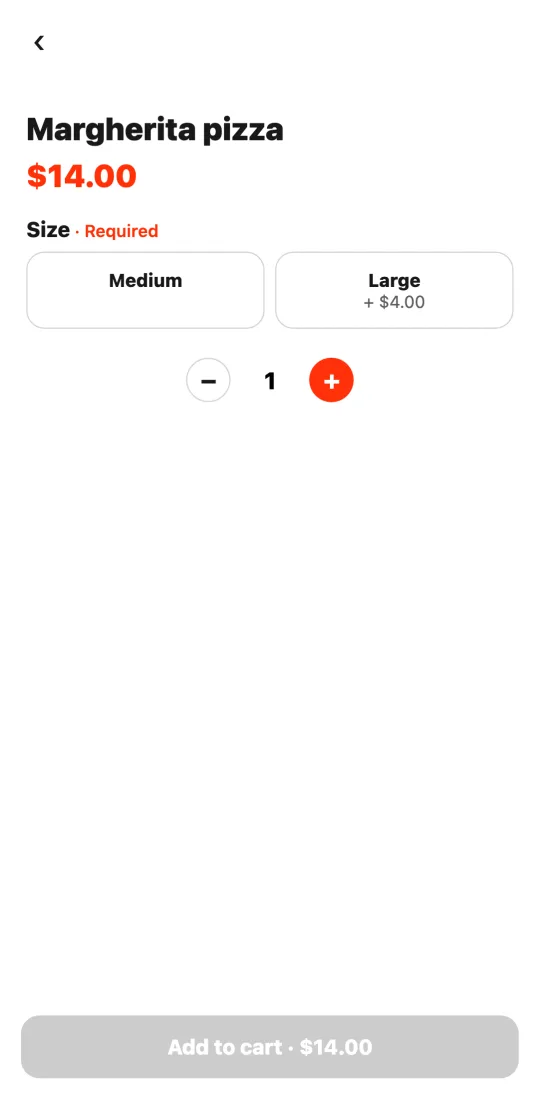
Steps
- Tap “Add” on the item.
- Choose in each group; required ones need at least one option.
- Tap “Add to cart.”
This guide answers
- How do I pick the size or extras of an item?
- Why won’t it let me add an item?