
Your hours: open and close on their own
Set your shifts per day and Tumbite opens and closes your restaurant at those times. Outside of them customers see when you open.
How it works
Under “My restaurant,” at the bottom, is “Hours.” Each day can have one or more shifts (for example, 11:00 to 15:00 and 18:00 to 23:00). A shift can end after midnight.
With hours set, your restaurant shows as open only within those shifts and with the take-orders button on. If you pause with the button, you’re closed even during your hours.
Outside your hours, customers see “Opens today at 6:00 PM” or “Opens tomorrow at 11:00 AM” in the app, and can’t order until then.
Without hours set, only the button applies: that’s how it worked before. The restaurant activation checklist will ask for hours.
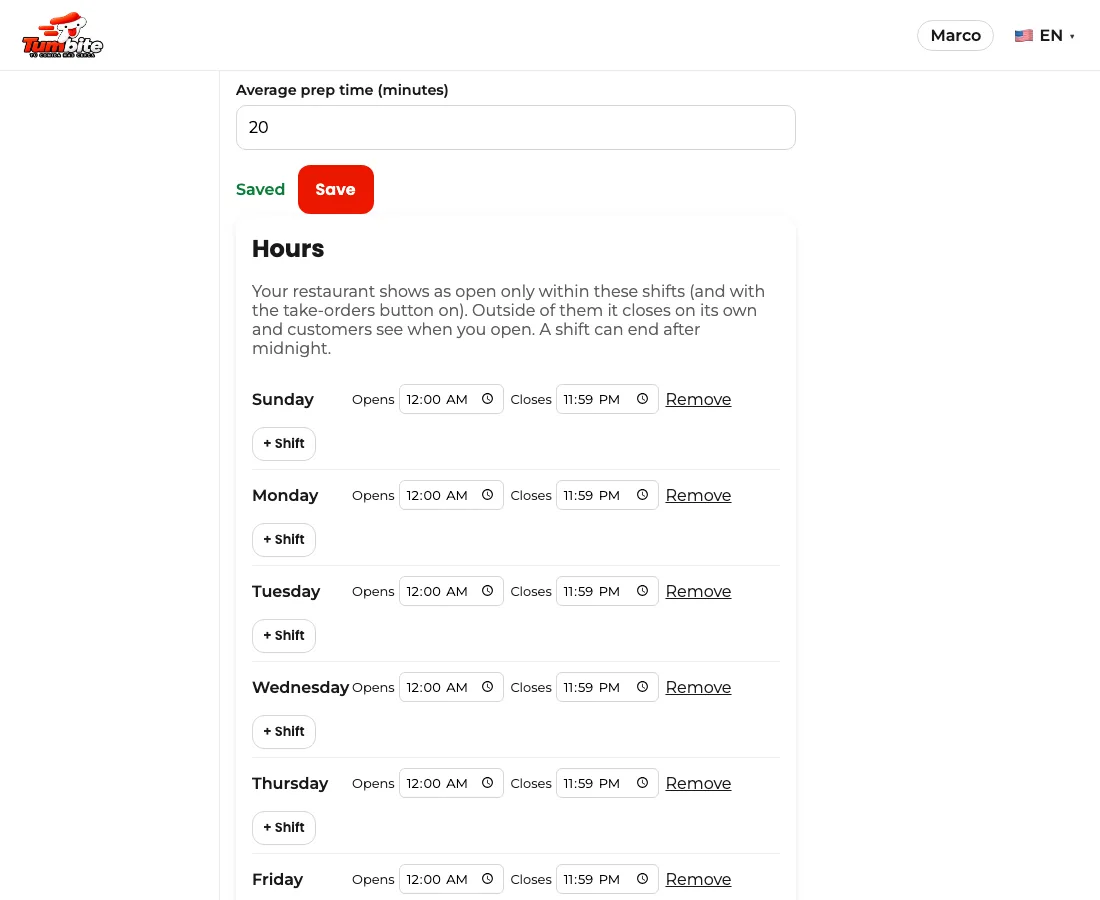
Steps
- My restaurant → Hours → “+ Shift” on each day, with the opening and closing time.
- If every day is the same, set Monday and tap “Copy Monday to the whole week.”
- Save. From then on you open and close automatically.
This guide answers
- How do I set my hours?
- What do customers see when I’m closed?
- Can I close after midnight?