
If you lose signal when delivering
The delivery photo (or “Handed to the customer”) is saved on your phone and sent on its own when the signal is back. Don’t redo it.
How it works
In a basement, an elevator, or an area with no coverage, the delivery photo may not go through. The app doesn’t lose it: it saves it on your phone and shows “Pending confirmation.”
When the signal is back, the app sends it on its own, in the background, and tells you “Delivery sent: it’s now confirmed.” No need to retake the photo or tap anything.
If the server rejects it (for example, because your arrival wasn’t confirmed yet), the app shows you the reason so you can sort it out.
The same goes for “Handed to the customer”: it’s saved and confirmed once the signal is back.
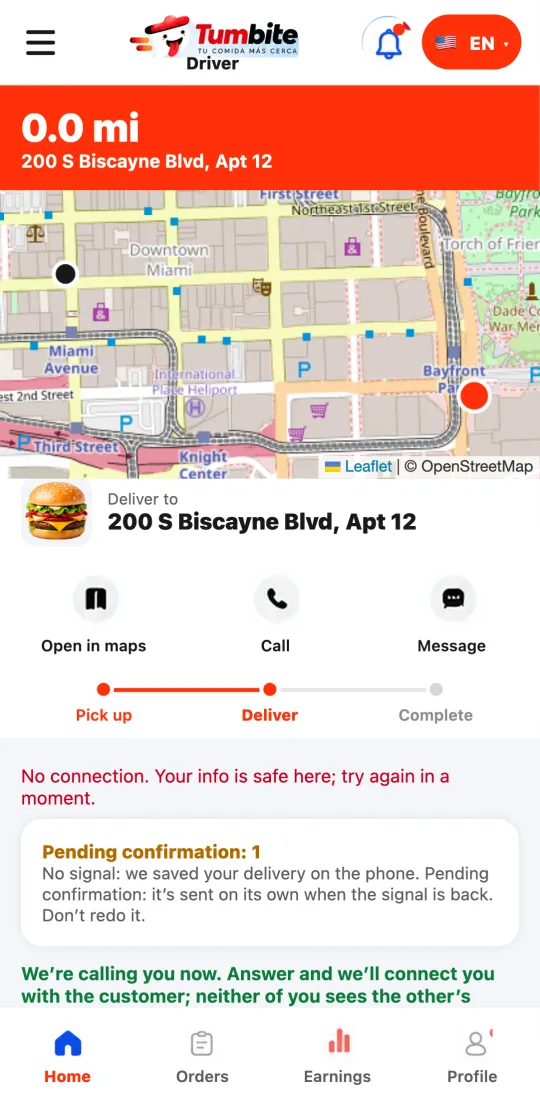
Steps
- Take the delivery photo as usual.
- If there’s no signal, you’ll see “Pending confirmation.” Carry on with your day.
- When the signal is back, the app sends it on its own and lets you know.
This guide answers
- What happens if I have no signal when I deliver?
- Do I have to retake the photo if it failed because of the connection?