
Rate the customer
After delivering, you can rate the customer with stars and, if something went wrong, say what happened.
How it works
Under “Orders” you see today’s deliveries you haven’t rated yet. Tap the stars and, if it’s 3 or fewer, pick what happened: didn’t come out, wrong address, rude or made you wait.
It’s optional. Only our support team sees it, to look after drivers; the customer doesn’t see your rating and nobody is blocked over one rating.
Each delivery can be rated once, on the same day.
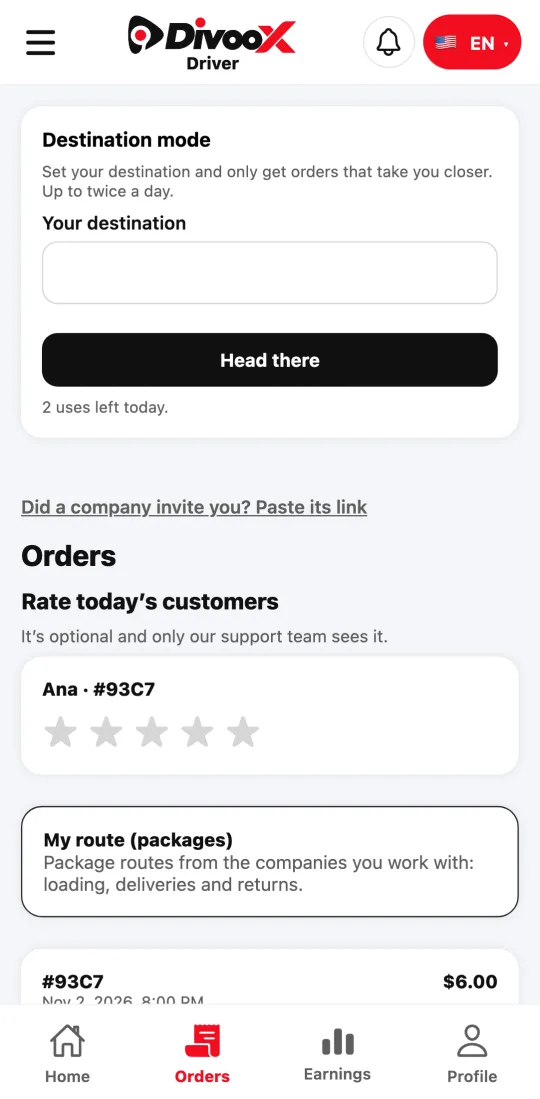
Steps
- Open “Orders”.
- Tap the stars for the delivery.
- If needed, pick what happened and send.
This guide answers
- Can I rate a customer?
- Does the customer see my rating?